
VISION BOARD · POLAROID
Polaroid vision board: cork board ideas and a free template
Polaroid vision board ideas for cork boards and digital boards: what to photograph, how to write captions, an example board and a free template.
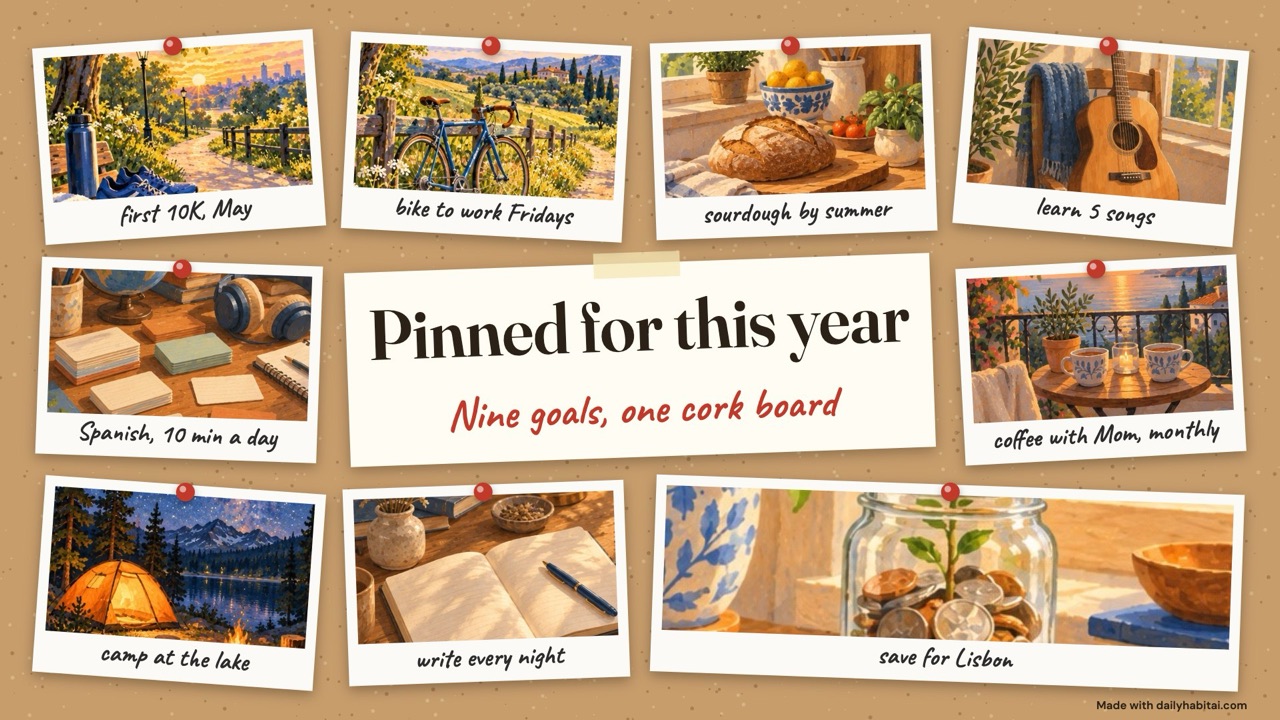
The short answer
A polaroid vision board uses instant-style photos pinned to a cork board or string, each with a short handwritten caption. Use 9 to 15 photos, many of them your own, and write the goal or next step in the white strip. Replace photos as you reach goals so the board stays current.
Polaroid boards look like a memory wall, and that is their strength. They are easy to change: unpin one photo, pin another. Real instant photos also feel more personal than magazine cutouts. Many people print phone photos in polaroid size instead of buying film, which costs less.
The white strip under each photo is the most useful part. Most boards leave it blank or write one word. Write a short goal and a month there instead, and your cork board becomes a planning tool you can update in seconds.
Polaroid vision board ideas
Pictures to use
- Your own running shoes by the door
- A friend you want to see more often
- The trail or park you want to walk
- Your desk after a good work session
- A meal you cooked and are proud of
- A concert ticket or boarding pass
- A page from your journal
- Your guitar, camera or sketchbook
- A plant you are keeping alive
- A labeled savings jar
- A book you want to finish
- The sunrise from your window
- Your dog on a walk
- A map with a place circled
- A handwritten recipe
- A screenshot of a class you signed up for
- A photo from last year you are proud of
Words and phrases
- keep going
- this year
- small steps
- made it
- next up
- say yes
- slow and steady
- with love
- on my way
- almost there
- one more
- done
- try again
- worth it
- pinned it
Print these and more with the vision board words sheet.
How to make a polaroid vision board
- Get a cork board, push pins or mini clothespins, and either instant film or polaroid-style prints of your phone photos.
- Choose 9 to 15 goals. Where you can, photograph your own version: your shoes, your desk, your kitchen.
- Write a short goal and, if useful, a month in each white strip. A fine permanent marker will not smudge on glossy paper.
- Lay the photos out in a loose grid before pinning. Leave a few empty pins for new goals during the year.
- When you reach a goal, move its photo to a done corner or flip it and write the date on the back.
VISION BOARD + DAILYHABITAI APP
How to use your vision board with the DailyHabitAI app
Your board shows what you want. The free app handles the how: one picture becomes a 30-day plan with a small daily step and a reminder. No account, it stays on your phone.
From tile to daily habit
| Tile on your board | Daily habit in the app | Start |
|---|---|---|
| Spanish, 10 min a day | Practice Spanish for 10 minutes, after I start the coffee maker | Make it my plan |
| write every night | Write three lines about the day, after I brush my teeth | Make it my plan |
| first 10K, May | Walk or jog for 15 minutes, after work | Make it my plan |
Five ways to use the board and the app together
- Board to plan in about two minutes. In the vision board maker, tap Make it a habit under any tile. The plan builder opens with your goal and your reason already filled in.
- Two nudges a day. Set the board as your lock screen and turn on the app's reminder at your cue time. You see the why on your wallpaper and get the small step from the app.
- Three goals at a time. The app keeps up to three active habits. Pick three tiles for this season, then archive one and bring in the next when it feels easy.
- Busy weeks do not break the board. Every day in the plan has a two-minute hard-day version, so a tile keeps moving even on a bad day.
- A monthly check-in. The app prompts short reviews on days 7, 14, 21 and 28. On the first of each month, look at the board and swap any picture that no longer fits.
Common mistakes to avoid
- Leaving the white strip blank, which wastes the best place to write a goal.
- Writing with a ballpoint on glossy photo paper, where it smears.
- Pinning so many photos that they overlap and hide each other.
- Never moving anything, so the board turns into a background you stop seeing.
Frequently asked questions
How do I make a polaroid vision board?
Print 9 to 15 photos in polaroid size or use instant film, write a short goal in each white strip, and pin them to a cork board, a string line or a wall with washi tape. Put your most important goal in the center at eye level, and leave room to add more.
Do I need a Polaroid camera?
No. Most people print phone photos as polaroid-style prints at home or through a photo service, which costs less than instant film. You can also make a digital polaroid board with our free maker, then print it or download it as a phone wallpaper.
What should I write on polaroid vision board captions?
Write the goal plus one detail that makes it concrete: a number, a month or a first step. For example, first 10K in May, or Spanish ten minutes a day. Short handwritten captions are easier to read from across the room than long quotes.
Cork board or wall for a polaroid vision board?
A cork board is easiest to change and does not mark the wall. A string line with mini clothespins works well in small spaces. Washi tape on a wall looks clean but is harder to rearrange. Pick the option you will actually update each month.
Sources and evidence
- Harkin et al. (2016): Does monitoring goal progress promote goal attainment? A meta-analysis of the experimental evidence — Across 138 studies (N = 19,951), interventions that increased progress monitoring promoted goal attainment (d = 0.40), with larger effects when progress was physically recorded or made public.
- Gollwitzer & Sheeran (2006): Implementation intentions and goal achievement: A meta-analysis of effects and processes — Across 94 independent tests, if-then plans that say when, where and how you will act had a medium-to-large effect (d = .65) on reaching goals.
- Pham & Taylor (1999): From thought to action: Effects of process- versus outcome-based mental simulations on performance — Students who pictured the process of studying, not just the good grade, studied more and earned better grades. Picturing the steps beats picturing only the result.